Donor Seva!
An end-to-end Donor Tax Exemption Management Service for NGOs.
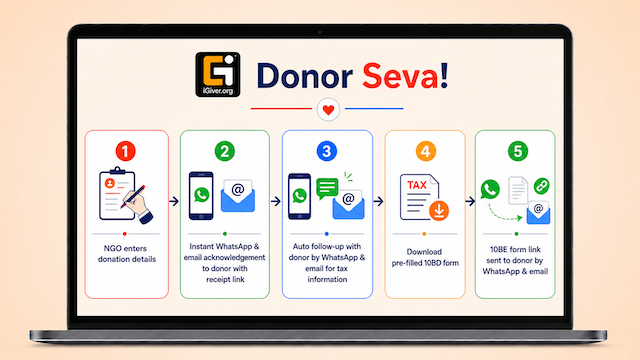

NGO admin enters donation details in the app, after getting a secret login PIN during one time registration with iGiver Donor Seva team.

iGiver DonorSeva processes the details and sends a PDF acknowledgment as confirmation to donor by SMS

iGiver DonorSeva runs automatically on a predefined interval to sends a link to the donor by WhatsApp and email. Using the link, donor clicks open a web form, and can verify/corrent their PAN details, or opts not to avail Tax emption.

If the notification is missed/ignored by Donor a reminder is sent again after a predefined interval.

Using the link, donor clicks open a web form, and can verify/corrent their PAN details, or opts not to avail Tax emption. This is the same link send with acknowledgement above.

The system automatically wishes the donor on all important festivals and also sends an automatic message to donors with the NGO partner's social media link every month. This is configurable.

NGO admin logs in to the admin dashboard to look at all donor details and also can download 10BD CSV as per IT dept format

NGO admin can also send 10BE form to donor automatically to WhatsApp and email via admin dashboard, in just ONE CLICK by uploading ZIP file from IT department.


Donor Seva is an initiative of Lokas AWS Technologies Pvt Ltd.
Copyright © 2024 Lokas AWS Technologies Pvt Ltd. All rights reserved.